





WooCommerce Multisite Search
In the realm of online shopping, providing a seamless and intuitive user experience is paramount. For WordPress Multisite environments that leverage WooCommerce, one key functionality that often remains lacking is a robust search engine. However, thanks to the WooCommerce Multisite Search plugin, this crucial gap is effectively bridged. By offering a flexible and maintenance-free solution, this plugin enables optimal product exposure and empowers customers to easily find the items they seek. In this article, we will delve into the importance of a comprehensive search engine and how the WooCommerce Multisite Search plugin revolutionizes product discovery.
The implementation is very flexible and does not require specific maintenance. It will integrate with any theme search layout or customized solution.
Table of Contents
- What Is WooCommerce Multisite Global Search?
- Why Default WooCommerce Search Falls Short
- Search Products Across Every Store in Your Network
- Improve Customer Experience and Conversions
- Works with any existing WooCommerce shop
- Compatible with Any WooCommerce Product Type
- How the WooCommerce Multisite Search works
- Optimized for performance
What Is WooCommerce Multisite Global Search?
WooCommerce Multisite Global Search allows customers to search products across every store in a WordPress Multisite network from a single search box.
By default, WooCommerce only searches products within the current site. If a customer is browsing Store A, products from Store B, Store C, or any other shop in the network will not appear in the search results.
WP Global Cart extends the standard WooCommerce search functionality and creates a network-wide search experience. Customers can discover products from all connected stores without needing to switch websites manually.
The result is a unified marketplace experience where every product in the network becomes easier to find, increasing visibility for all stores while helping customers locate exactly what they need faster.
Why Default WooCommerce Search Falls Short
A standard WooCommerce Multisite installation treats each store as an independent website. While this approach works well for managing separate shops, it creates limitations for customers trying to find products across the network.
For example, a customer searching for “running shoes” on one subsite will only see products available in that specific store. Relevant products located on other stores remain hidden, even though they belong to the same business network.
This fragmented experience can lead to:
- Missed sales opportunities
- Lower product visibility
- Increased customer frustration
- Higher bounce rates
- Reduced cross-store discovery
Global Search removes these limitations by providing a single search experience across the entire WooCommerce Multisite network.
Search Products Across Every Store in Your Network
WP Global Cart enables customers to search products from all connected stores regardless of where they begin their shopping journey.
Whether your network consists of:
- Country-specific stores
- Brand-focused stores
- Vendor stores
- Department stores
- Franchise locations
- Language-specific shops
the search engine can return relevant results from across the entire network.
Customers simply enter their search term once and instantly receive results that include products from every participating store. Product links direct users to the appropriate shop while maintaining the seamless shopping experience provided by WP Global Cart.
This creates a true multi-store marketplace environment while preserving the independence of each WooCommerce store.
Improve Customer Experience and Conversions
A powerful search experience is one of the most effective ways to help customers find products quickly and complete purchases.
When shoppers can search across your entire network, they spend less time navigating between stores and more time discovering products that match their needs.
Benefits include:
- Faster product discovery
- Better customer satisfaction
- Increased product exposure
- Higher average order value
- More cross-store purchases
- Improved conversion rates
Instead of limiting customers to a single storefront, Global Search turns your entire WooCommerce Multisite network into one connected shopping destination.
Works with any existing WooCommerce shop
Any WordPress theme which includes support for WooCommerce, incorporates a search input area where the customers search the shop. If already visible, there are no additional steps to take, the code activation makes the search become available for interrogation for all shops in the network. The results become cross-site accessible from that point.
If a WordPress theme does not support WooCommerce out of the box, the global search integration is still easy to achieve through the default WooCommerce widget called Product Search This can be found within Appearance > Widgets. The code will know how to interact with the widget to return products from all shops when doing a search.
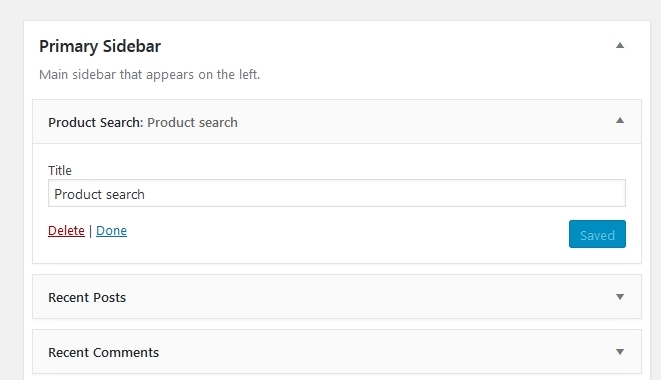
WooCommerce Product Search widget
Compatible with Any WooCommerce Product Type
WooCommerce Multisite Global Search is designed to work seamlessly with standard WooCommerce product structures.
Supported product types include:
- Simple products
- Variable products
- Grouped products
- External products
- Affiliate products
- Custom product types created by third-party plugins
As your stores grow and new product types are introduced, the search functionality continues to integrate naturally within the WooCommerce ecosystem.
No special product configuration is required.
How the WooCommerce Multisite Search works
The search results interface is the same as the theme default, it just includes the data from all shops in the network accordingly to the search criteria
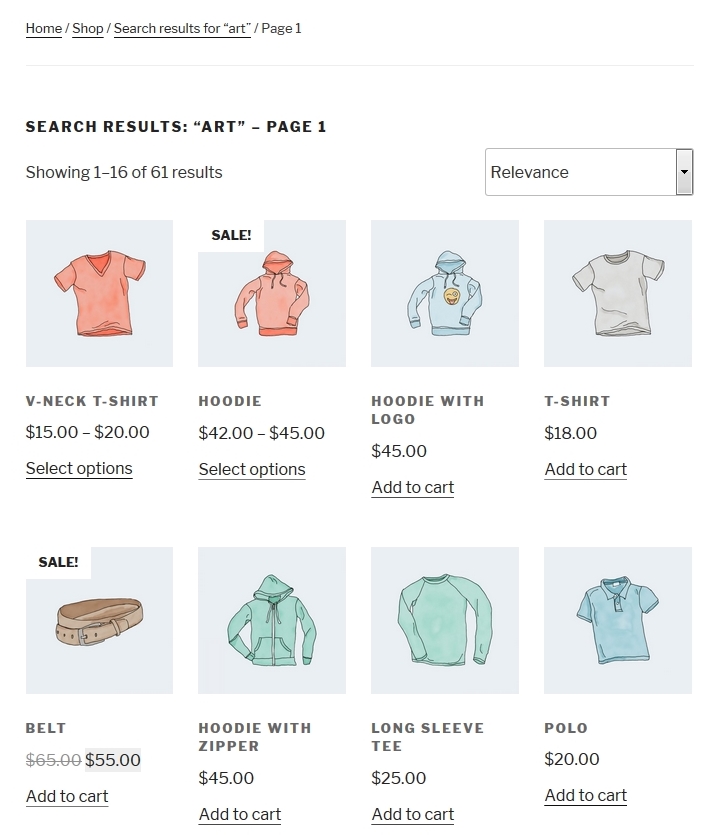
Sample Search Results page
The search interface pagination and filters are still working accordingly. The code will know how to produce the appropriate queries to order the results per defined filter e.g. relevance, popularity, rating, price etc

Search results Filtering
Optimized for performance
The search code is optimized for performance. So it will not require special hardware to run. The database interrogation is performed through MySQL queries to ensure the fastest response possible. WordPress custom queries still perform as usual. So additional parameters can pass through the search query as taxonomies or/and meta, without breaking the global search.
Enhanced mode is available for the global search, by checking also the specified mete fields.
The WooCommerce Multisite Search functionality is available for the Developer package.